Latest Article Get our latest posts by subscribing this site
DESCRIPTION
魔漫相机 (MomentCam / Moman Camera / Magic Man Camera) is the world's first camera directly to the people filmed humorous cartoon camera. 魔漫相机 (MomentCam / Moman Camera / Magic Man Camera) is different from other cameras Sketch filter, it is not a rendering of the original photo image, but every slap, will shoot creative and unexpected surprises.
You never imagined you would be like the next one, hilarious humor ideas will make your life fun. 魔漫相机 (MomentCam / Moman Camera / Magic Man Camera) not only has the artist's painting technique, the artist also has a rich imagination, work is no longer a photo shoot a replica, but has artistic value of the boutique.
魔漫相机 (MomentCam / Moman Camera / Magic Man Camera) is installed in the phone cartoonist for you to draw your own artwork.
SCREENSHOT
DOWNLOAD
DESCRIPTION
Is framaroot work on my device ?
If your device is in the compatibility list above, the short answer is : yes.
If your device is not in the compatibility list and it embed one of the processor mentionned above, the answer is : try it and see.
Why framaroot doesn't root anymore after I update my device ?
Because framaroot exploit security holes present in several devices which has been patched with update you have done, so exploits can't root your device anymore. Framaroot's exploits have a very short life to keep your device "less exposed" to others malicious application. Keep in mind that framaroot is not a permanent rooting application.
I loose root after update, what I can do to root my device now ?
An advice : if you want to have a chance to keep root after update, don't update with Kies or ODIN for samsung devices or don't flash system partition, prefer OTA update and use OTA survival feature in Superuser or SuperSU.
And if you have no choice, you can use the traditional method : flash tools specific to your device
Will framaroot include more exploits ?
Yes, but don't ask when since I don't know myself, it depend of the vendors fix response.
Framaroot crash when I select Gandalf exploit ?
Often the first time you launch Framaroot by selecting Gandalf as exploit, it crash Framaroot. Don't worry, in this case you have to re-launch Framaroot and select Gandalf again, the second time it should work.
What means error# on result ?
All errors less or equal to 9 mean your device is not vulnerable.
If you get error#10, give a try with Framaroot 1.5.3.
All other errors need some investigation about your kernel image.
!! Important !!
Success with this application void warranty on your device.
Read the FAQ before posting your question.
Version 1.6.1: Remove Superuser as it fail to install. Add execution support from adb command line.
Version 1.6.0: Add Pippin exploit (potentially affect Huawei K3V2 based devices)
Version 1.5.3: An attempt to fix Gandalf error#10
Version 1.5.2: Revert to exploitation fix included in 1.4.1. Add Slovakian and Italian languages. Error # added in toast message when exploit failed (report the error number in this thread so I could give you the reason of failure). Previously fix for Framaroot crash was a dirty hack, with this version you shouldn't encounter crash.
Version 1.5.1: Should fix Framaroot crashes.
Version 1.5.0: Add Boromir exploit (potentially affect many Mediatek based devices).
Version 1.4.3: Update SuperSU to 1.34. Rewrote the fix include in 1.4.1 for better but slower exploitation.
Version 1.4.2: Add Russian and French languages. Add scrollbar for exploit list. Update SuperSU to 1.30
Version 1.4.1: Fix a bug in exploitation due to the different kernel data alignement between version and devices, so if exploits didn't work before it "may" work with this version if your device is vulnerable
Version 1.4: Add Gandalf exploit (potentially affect Qualcomm based devices, tested on Nexus 4, as always feedbacks are welcome)
Version 1.3: Add Aragorn and Legolas exploits (could affect wide range of samsung devices including non exynos devices, please give feedbacks for your devices. Thanks)
Version 1.2.1: Fix unroot bug. Improvements for exploitation. Embed SuperSU 1.25
Version 1.2: Add possibility to Install Superuser, Install SuperSU and Unroot
Version 1.1: Frodo exploit added
Version 1.0: Initial release
Compatibility for Qualcomm devices (Gandalf exploit only) :
Asus Padfone 1/2
Asus Padfone Infinity
Asus Transformer Pad Infinity TF700KL
BW T18+ (Fortis Evo)
Cloudfone Thrill 430x
Disgo 8400g
DNS S4504/S4503/S4502
FAEA F1
Gigabyte GSmart G1315 Skate
Gigabyte GSmart Rio R1
Google Nexus 4
Highscreen Spark/OMEGA Q/Blast/Strike/Boost
HTC One S
Huawei Honor Pro (U8950-1)
Huawei U8815/U8816 Ascend G300/G301
Huawei U8825D Ascend G330D
Karbonn Titanium S5
Kyocera Torque
Lenovo S870E
LG Nitro HD
LG L7 II P710/P714/P715
LG Optimus F5 (P875)
LG Optimus G E970/E975
LG Optimus L3 II E425
LG Optimus L5 E610/612/615
LG Optimus L7 II P710/P713/ P714/P715
LG Optimus L7 P700/Р705
LG Optimus LTE 2
MEDION LIFE P4013
Micromax A111 Canvas Doodle
Oppo Find 5
Orange Nivo
Pantech Discover
Pantech IM-A840S Vega S5
Samsung Galaxy Win I8552
Sharp Aquos Phone SH930W
Sony Xperia E C1505/Dual C1605
Sony Xperia L C210X
teXet TM-3204R
teXet TM-4677
Xiaomi Mi-2S
ZTE V880G/ZTE V955
Waiting feedbacks ...
Compatibility for MTK devices (Boromir exploit only) :
Alcatel OT 4030D S'POP
Alcatel OT 8008D Scribe HD
Alcatel OT 997D
Alcatel OT Idol 6030X/6030D/6030H
Amoi N828
ASUS Memo Pad HD 7
Chinese Star S7589
DAXIAN XY100S
Explay HD Quad
Explay infinity II
Explay Polo
Explay Surfer 7.32 3G
Explay Surfer 8.31 3G
Fly IQ440 Energie
Fly IQ441 Radiance
Fly IQ442 Miracle
Fly IQ443 Trend
Fly IQ446 Magic
Fly IQ450 Quattro Horizon 2
Fly IQ451
GoClever Fone 570Q
Haipai I9389
Highscreen Alpha GTX
HKC Q79 3G
Huawei U8836D G500 Pro
IconBIT NetTAB Space 3G Duo
iOcean X7
Jiayu G2
Jiayu G3S
Jiayu G4
KENEKSI Beta
Lava iris 405
Lenovo IdeaPhone P700i
Lenovo IdeaPhone S720
Lenovo IdeaTab A3000-H
Lenovo IdeaTab S6000-H
Lenovo P770
Lenovo S820, S920, A390
Micromax Canvas HD
Motorola RAZR D3
Newman N1
Oppo findway U7015
OUMEI X5
Philips W536
Philips W736
Prestigio MultiPhone 4055
Prestigio MultiPhone PAP 4505DUO
Sharp AQUOS SH837W
Star S5 Butterfly
TeXet NaviPad TM-7055HD
Texet TM-5277
THL V12
THL W100 (130711)
THL W200
ZOPO C2 Platinum
ZOPO ZP 910
ZOPO ZP300+
ZOPO ZP900 Leader
ZTE V880G/H
ZTE V987 Grand X Quad
Waiting feedbacks ...
Compatibility for Huawei K3V2 devices (Pippin exploit only) :
Waiting feedbacks ...
Compatibility for Samsung devices (Legolas and Aragorn exploits only) :
Samsung Galaxy Core GT-I8262
Samsung Galaxy Proclaim S720C
Samsung Galaxy Young GT-S6312/GT-S6310
Samsung Lightray SCH-R940
Waiting feedbacks ...
Compatibility for Exynos devices (Sam, Frodo, Legolas and Aragorn exploits only) :
AT&T Galaxy Note 2 SGH-I317
Highscreen Explosion
Hyundai T7s
Impression 9702 (Exynos 4412)
Lenovo K860/К860i
Newman N2
Meizu MX2
Samsung Galaxy Camera EK-GC100
Samsung Galaxy Note 10.1 GT-N8000, GT-N8010, GT-N8013, GT-N8020
Samsung Galaxy Note 2 GT-N7100
Samsung Galaxy Note 2 LTE GT-N7105
Samsung Galaxy Note 8.0
Samsung Galaxy Note GT-N7000
Samsung Galaxy S GT-i9000
Samsung Galaxy S2 AT&T SGH-I777
Samsung Galaxy S2 Epic 4G Touch - SPH-D710
Samsung Galaxy S2 GT-I9100
Samsung Galaxy S3 GT-I9300
Samsung Galaxy S3 LTE GT-I9305
Samsung Galaxy Tab Plus GT-P6200/GT-P6210
Samsung Galaxy Tab 7.7 GT-P6800/GT-P6810
Samsung SGH-i997 Infuse 4G
T-Mobile Galaxy Note 2 T-889
Verizon Galaxy Note 2 SCH-I605
iBerry Auxus CoreX2 3G and CoreX4 3G
Compatibility for Omap36XX devices (Gimli exploit only) :
Archos Gen8
Cliq 2 MB611
Coolpad Quattro 4G
Droid 2 (a955)
Droid 2 Global (a956)
Droid X (MB810)
LG Marquee LS855
LG P970 Optimus Black
Motorola DEFY+ (MB525 / MB526)
Motorola Droid PRO
Motorola Droid X
Motorola XPRT
Parrot ASTEROID Smart
R2D2 (a957)
Possible case once application is launched
A popup saying "Your device seems not vulnerable to exploit included in Framaroot", in this case you can uninstall app
You seeing one or more exploit name, also click on one after you have selected an action and you will see one of the above messages
Possible case once exploit is launched
"Success ... Superuser and su binary installed. You have to reboot your device"
"Failed ... Exploit work but installation of Superuser and su binary have failed"
"Half-Success :-/ ... system partition is read-only, use local.prop trick. Reboot your device and use adb to see if it run as root", happen when the filesystem in use on system partition is a read only filesystem (ex: squashfs)
"Failed ... Try another exploit if available"
SCREENSHOT
DOWNLOAD
[APK] Framaroot v1.6.1
DESCRIPTION
Requirements: Android 2.1+, ROOT, Titanium Backup
Overview: What is WhatsApp+? Basically it is a customizable WhatsApp where you can change lots of colours, sizes, and many other visual MODs In addition you can increase upload media limit (stock limit is 16Mb) to send large music files or videos.
You can increase quality of pictures sent (by default resolution is decreased quite a lot) You can share music just with one click You can add contact profile pictures to their chats You can hide contact profile pictures and show phonebook pictures (in chat screen) Built-in theme viewer and downloader. Check WhatsApp+ users themes online and apply theme if you like And more to come Remember to previously uninstall whatsapp if you come from the official version (if not you will get the “not installed” error)
What's new in this version:
* Wrong version in ‘About’ screen solved
* Disable Voice Notes MOD’ is back
* New MOD 2.2.7D date pending Msg Color in Chats screen
* New MOD 2.2.21 to change voice note mic icon color
* Other minor bugs solved
Tutorials:
1. Extract & Copy all files in folder “Plus Donation v1.04 Titanium Backup files” to Titanium Backup folder
2. Open Titanium Backup, tap Options > Refresh apps list
3. Restore Plus donation data. Don’t open plus donation key. Just hide it from launcher after restoring data.
4. Done.
This app has NO advertisements
SCREENSHOT
DOWNLOAD
[APK] WhatsApp+ v4.45D
DESCRIPTION
TweetCaster has a gorgeous look with an intuitive interface that makes it super easy to use while packing in tons of features. Optimized for both phones and tablets, TweetCaster has been highly praised by users and reviewers.
Features:
* Multiple Twitter Accounts – Manage and easily post to multiple Twitter accounts
* Facebook – Simultaneously post to Twitter and Facebook
* Notifications – Get notified of new tweets, mentions, messages, or by specific user. Notifications are expandable and actionable on Android 4.1+
* Photo Effects – Add cool filters, effects and captions to photos, as you upload them
* Zip It – Zip annoying tweeters or keywords from your timeline without unfollowing
* Widgets – multiple widgets, including one that is scrollable and sizeable (Android 3.0+)!
* Themes – Twelve vibrant, colorful themes
* Sync between devices – Keep your place in the timeline across multiple devices and web using TweetCaster.com
* Smart Filter – Filter your timeline to look only at tweets with photos, links, videos, or hide retweets or replies
* Search Party – How Twitter search was meant to be! Lets you search just your own timeline, someone else’s, or all of Twitter.
* Smart Lists – The best way to use Twitter Lists, including robust list management and viewing tools
* My Stats – Up-to-the-minute tally of stats includes Most Retweeted, Most Mentioned, Most Favorited, & many more
* Photo previews – View previews and open photos from most image services, including Instagram
* Speak Tweets – Tap microphone on New Tweet screen to speak instead of typing
* Schedule Tweets – Compose a tweet and send later or send to Buffer
* Read Later – Save links to read/view later using Pocket, Instapaper, or Readability
* Streaming – Tweets are streaming in real-time when connect via WiFi
* Readability – View links in Readability mode for a mobile-optimized view
* Color Code Tweets –Color code your Tweets and mentions
* Long Tweets – Use Twitlonger to tweet over 140 characters
* Who to Follow – Suggests people to follow
What People are Saying:
“Nicely designed… Colorful but clean.” – CNET
“Contender for best Twitter app. 5/5 bars.” – Appolicious
“Excellent Twitter client.” – TUAW
“This is the best Twitter app I've found. Very easy to use and very beautiful.” – Che, TweetCaster User (v6.8)
What's new in this version :
- Fixes issue with timeline placement
- Stability improvements
- Fixes crash when searching for people and other crashes
SCREENSHOT
DOWNLOAD
[APK] TweetCaster Pro for Twitter v7.9.0
DESCRIPTION
Live wallpaper of surpassing beauty, which is scenery of fresh wind power generation.
It is likely to look admiringly at scudding clouds in magnificence and movements of wing that turns soundlessly.
by uistore.net.
★Scenery changes according to time, Morning, daytime, early evening, night.
★The rotational speed of pinwheels synchronize with the battery power. (*Paidversion only)
★You can select with or without synchronization at time, the speed that clouds move, with or without battery synchronization of propellers. (*Paidversion only)
★This original design won the Asian section grand prix in Code Camp Competition 2008 of Nokia. Please enjoy overwhelming power of design!
★It corresponds to a horizontal screen.
★Able to store it on the SD card.(*OS2.2 or more)(*When you set it as wall paper, please save (move) it in the main body. The setting may returns to a default when you reboot.)
※Setting method
home screen>menu>Wallpaper>Live Wallpaper
※According to memory conditions,it may not be able to set normally. In that case, please restart your portable terminal and set it again.
※If you exit live wallpaper,it may not be able to exit normally by using task end application program such as task killer. Please exit it after setting other live wallpapers.
※When not normally working by updating it, it improves it when doing by reinstalling it after uninstalling it.
※When updating it with setting the wallpaper, the screen may turn black in the case of OS2.1.You can set it correctly by resetting after setting other live wall papers. It's a feature for OS, and it contains improved OS2.2.
【New function addition! Live wall papers and themes are all you can use!】
Live wallpapers and themes are all you can use when registering to the monthly member!
Let's customize with live wallpapers and themes!
■What is monthly membership?
It is profitable limitlessly usable service of live wallpapers and the themes that uistore delivers for a monthly fee.
・Contents for the monthly will be addied one after another.
※A part of contents is excluded.
It is necessary to download home application "Final Launcher" for the monthly member registration.
・ Final Launcher download URL
https://play.google.com/store/apps/details?id=uistore.fieldsystem.final_launcher
・Compatible models: Android 2.3.3 over
■Monthly member registration method
・You can register from "Monthly member" in Home setting after pressing the menu button of Final Launcher.
・You can register from the advertisement displayed on the home screen of live wallpaper of free version for the monthly member.
※If you have uninstalled the Final launcher during the monthly member, all live wallpapers you had installed will automatically be turned to limited version.
The use of full version of live wallpaper and the theme by the monthly member registration operates only by "Final Launcher".
Please note that other home applications return to the limitation version.
SCREENSHOT
DOWNLOAD
[APK] WIND LiveWallpaper v2.0
DESCRIPTION
Description
The OFFICIAL version of BBM™ from BlackBerry is now here for Android. Get the free BBM app for the best way to stay connected with friends and family. Download it now.
Chat with friends on Android, BlackBerry and iPhone:
• BBM is always on and always connected – no app to open
• Know when messages have been delivered (D’s) and read (R’s)
• Share photos, files, documents, voice notes and more
• See when contacts are responding to your message
• Emoticons for every mood and emotion let you express yourself
BBM lets you protect your privacy. You control it:
• You chose how to share your information - BBM uses PINs instead of phone numbers or email addresses so that it's more private and you always control who can contact you
• You chose your contacts – 2-way opt-in means you have control over who is able to message you
Chat and Share with many at once:
• Groups – BBM groups help you share pictures, lists and appointments with group members. You can even be in a group with people who aren't part of your own BBM contact list.
• Multi-person chats – Invite multiple contacts to have a chat together.
• Broadcast messages – Send a message to multiple BBM contacts at one time.
Create your own BBM profile:
• Post a profile picture using images, pictures or even animated pictures (GIFs).
• Update your status to let people know what you’re up to or how you feel
Download BBM for free today.
SCREENSHOT
DOWNLOAD
[APK] BBM v1.0.069
[APK] BBM v1.0.070
[APK] BBM v1.0.072
[APK] BBM for GingerBread ARMv7 *don't complain if you get FORCE CLOSE
DESCRIPTION
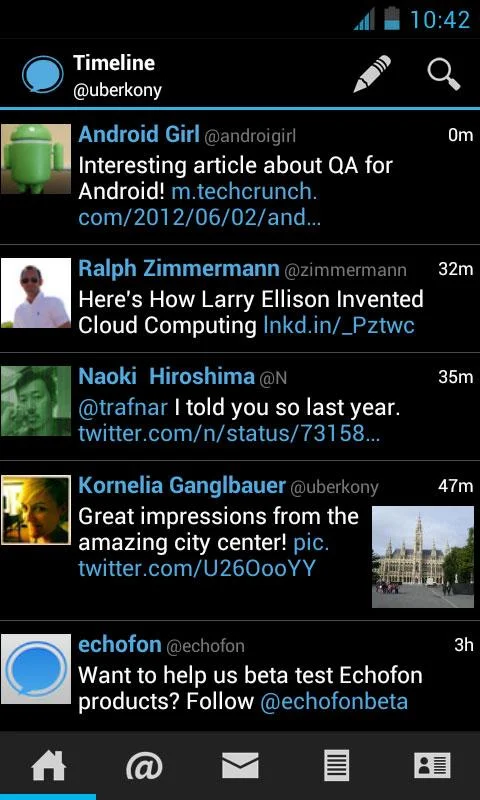
Echofon is the easy-to-use, super fast Twitter app that smartly syncs across all your devices.
Wrapped in a beautiful, clean interface, Echofon for Android packs a punch, featuring gorgeous desktop widget, instant notifications, light and dark color themes and more – all the Twitter features you need to bring order to your busy social media life.
Key Features:
* Full-featured dashboard widgets
* Sync between all your Echofon apps on Android or iOS devices so you never read a Tweet, @Mention or Direct Message twice
* Mute Users
* Background notifications alert you of new Direct Messages and @Mentions
* Easily manage multiple Twitter accounts
* Choose from light or battery-saving dark color themes
* View threaded conversations all in one place to easily keep track of who said what
* Full set of Twitter functionality: Tweet, Retweet, Direct Message, @Mention, lists
* Offers photo previews right in your Twitter timeline
Coming soon
* Gap detection
* In-app browser/in-app picture viewer
Please reply to @echofonbeta with comments/questions/issues, because we can not reply to your reviews in Google Play. Otherwise you can leave your Twitter @username in your reviews, if you would like to be contacted from us regarding you questions/issues.
What's New In This Version :
- Fix for login issues on HTC devices
- Timestamp correction
- Retry button on "Listed" screen
- Proper handling for removing Favorites
- Proper Tweet length calculation-Tweets with URL
- Fixed: doubled entries in Muted menu
- Fixed: Links shared via email
- Fixed startup crashes on Android 2.2
- Fixed: Widget not working on 4.0.4
-Schedule your Tweets via Buffer for optimal message timing
-No limitation to 140 characters any more with TMI.me
-Lots of improvements and bugfixes
SCREENSHOT
DOWNLOAD
[APK] Echofon Pro v2.2.2.0
DESCRIPTION
Draw beautiful bokeh effect to your photo.The most natural and realistic bokeh!
Real Bokeh helps you to draw beautiful bokeh effects(light effects) to your photos. Not just bokeh effect, but the most natural and realistic one ever!
Features
- 16 beautiful bokeh shapes
- Draw multiple bokehs with finger touch
- Apply multiple bokeh shapes to one photo
- Change bokeh size (large, medium and small)
- Change opacity
- Multiple bokeh colors with easy color picker (28 colors)
- Easy undo and clear all
- Save as full resolution
- Share to Instagram, Facebook, Twitter and other apps
What's new inthis version : (Updated : Aug 26, 2013)
- New Feature Added : 23 Light Leak Effect
- UI Enhancement
- Minor Bug Fix
This app has NO advertisements
SCREENSHOT
DOWNLOAD
[APK] Real Bokeh v2.0
DESCRIPTION
Extract multi-part rar archives directly on your phone.
* Brand new Unrar engine, supports more archives
* Passworded archives now supported!
* 350% performance improvement!
* Improved user interface
* Better error handling and memory management
* Ad free
-----------
Fixed a bug on the Motorola Atrix where the SD card was not accessible with the file picker.
Fixed a bug where sometimes the link to the parent directory wasn't at the top of the list.
SCREENSHOT
DOWNLOAD
DESCRIPTION
Designed by GO Dev Team, ‘Next Launcher 3D’ shows how a 3-D and dynamic launcher could be possibly like -- Extend imagination, extend capabilities. Wish you enjoy this app and have a wonderful holiday!
Features:
1. Various operation for icons: icons support rotation, reset, select, align and so on. Operation is easy and fantastic.
2 .Unlimited screen layout: placing icons or widgets randomly which forms your own home screen.
3. Stereoscopic screen preview: lots of screen display effects, dazzling animation of screen switching about adding or deleting screen.
4. Quick screen management: adding different kinds of elements in screen edit including application icons, folders and widgets. It’ll support changing wallpapers and themes soon.
5. Rotatable dock: inverting upward or downward the Dock can quickly switch among home screen, screen edit and screen preview.
6. Powerful app drawer: icons can be arranged by names or by time, and folders can be created by overlaying icons. Batch mode and operation of adding apps to screen are also available.
7. Beautiful scrolling effects: a variety of app drawer scrolling effects that provide a distinctive screen switching experience.
8. Fancy 3D widgets: 3D widgets that are based on Next Launcher are coming soon!
Tips:
1.Please make sure your device has installed Google Play.
2.Phone performance:Android 2.3.3 and up; Dual-core models is better.
3. Suggestion:Watch the video of Next Launcher first, to know about the cool operation of the product.
What's new in this version:
Major features:
1. Two new gestures CW & CCW (Next Key -> Gesture settings)
2. New dock transition effect (Effect settings -> Dock transition effects)
3. Improved the loading speed.
4. Fixed the dock icon disappearing issue
5. Fixed some crash bugs.
This app has NO advertisements
SCREENSHOT
DOWNLOAD
DESCRIPTION
Escaping for the weekend and your friends are staying home? Make them suffer with a beach photo and weather conditions from Hawaii or Malibu.
Photo from a morning session of seaside jogging? Make your friends jealous.
Traveling across sunny and colourful Thailand when it's a cold and dark winter in Minneapolis? Show them who is the real player here!
Snowboarding in Colorado in deep powder and sunny 25F when your mates are closed in an office space with no chances for holidays? YOU RULE!
How does it work?
- InstaWeather PRO is your weather overlay App for Instagram!
Thanks to InstaWeather Pro you can share on Instagram the weather report and forecast from the place where your are now – on top of your favourite photo that you have just snapped with your iPhone.
Picture shared through Instagram, combined with all the important forecast data and place name, gives full view of actual outside conditions!
InstaWeather PRO is full of features:
You can easily choose your favourite skin from 15 available with various weather data: from current temperature and simple info about the location to very detailed forecast with air pressure, temperature, rain, wind power and direction.
You can also choose the period of the displayed forecast: today, next few days or a whole week.
It works with Celsius & Fahrenheit, kilometres, miles and many others.
Install and share the weather with friends! Let the weather be always good for you!
Make your personal weather report NOW!!
What's in this version : (Updated : Jul 31, 2013)
fix for corrupted photos on devices with screen resolution 480pixels
added support for FullHD phones
fixed possible crash bug when entering custom location
quality fix for Instagram uploads - now your pictures will look as good as possible
This app has NO advertisements
SCREENSHOT
DOWNLOAD
[APK] InstaWeather Pro v2.0.3
DESCRIPTION
Photos without any description are boring as hell!
Add something special to them through the InstaPlace!
Sharing options : ★ Facebook ★ Twitter ★ Instagram ★ Foursquare
If you like to share the photos of good meals we have special “delicious” skin for you.
Do you want to send immediately a virtual postcard from some beauty or interesting place – use the skin “greetings from…”
Maybe you want to share the photo of place which you are in love? InstaPlace have special skin for it!
InstaPlace is like a swiss army knife with various edges for any occasion. You decide how to use it!
Instaplace is your location overlay App for Instagram.
You can share on Instagram a photos with various desciptions from the place where your are now – on top of your favourite photo that you have just snapped with your iPhone.
By one finger move you can decide to put the description in top or bottom photo part.
Ready photo, customized by InstaPlace, can be easily posted to your Instagram, Facebook or Twitter!
What's in this version : (Updated : Aug 7, 2013)
SUMMER SET SKINS
images are optimized for Instagram and FB sharing
added Facebook Places
fixed support for 768x1024 phones
This app has no advertisements
SCREENSHOT
DOWNLOAD
[APK] InstaPlace Pro v1.2.1
DESCRIPTION
Titanium Backup is the most powerful backup tool on Android, and then some.
☆Needs ROOT, Android 1.5-4.2+ (ARM,x86,MIPS)
☆Over 8 million users, 30+ languages.
☆PRO Key is available on Play Store!
☆Voted #1 TOP ROOT APP on Twitter.
☆Problem? See titaniumtrack.com/kb
☆Scroll down for more info & DEMO VIDEOS ;-)
☆ ☆ ☆
You can backup, restore, freeze (with Pro) your apps + data + Market links. This includes all protected apps & system apps, plus external data on your SD card. You can do 0-click batch & scheduled backups. Backups will operate without closing any apps (with Pro). You can move any app (or app data) to/from the SD card. You can browse any app's data and even query the Market to see detailed information about the app.
Also see the paid PRO key which adds EVEN MORE awesome features such as:
[✔] 0-click batch restores
[✔] Keep multiple backups per app
[✔] Backup/restore SMS,MMS,calls,bookmarks,Wi-Fi AP as XML
[✔] Multi-user app data
[✔] Apps freezer
[✔] Sync to/from Dropbox (manual/scheduled)
[✔] Sync to/from Box (manual/scheduled)
[✔] Sync to/from Google Drive (manual/scheduled)
[✔] TB Web Server: download/upload your backups as a single ZIP on your computer
[✔] Convert user apps <=> system apps
[✔] Integrate system app updates into ROM
[✔] Encryption
[✔] Market Doctor (relink apps to Market)
[✔] "Destroy all Market links" feature
[✔] Hypershell speed
[✔] Backup apps without closing them!
[✔] Create your own update.zip containing apps+data!
[✔] Restore individual apps+data from non-root ADB backups!
[✔] Restore individual apps+data from CWM backups!
[✔] Restore individual apps+data from TWRP backups!
[✔] Market "auto updating" manager
[✔] Dalvik cache cleaner
[✔] Integrate Dalvik cache system elements into ROM
[✔] Unlimited schedules
[✔] Load/Save a Filter and use it in Widgets/Schedules
[✔] Change the device's Android ID, restore it from a backup or after a factory reset
[✔] Protect backup against deletion
[✔] Send backup (to e-mail/cloud) and import it in 1 click
[✔] Backup→Verify→Un-install an app in one shot
[✔] Freeze/defrost/launch apps in a single click
[✔] CSV export any app DB (e-mail or Google Docs)
[✔] Convert app data to/from fast WAL format
[✔] WAY MORE!
What's in this version:
• Can specify power conditions on scheduled jobs.
• Added initial support for Android 4.3.
• Added data exclusion for Media Storage (ie: gallery cache) (enabled by default).
• Fixed "convert to system app" issue on Android 4.2+ (some converted apps failed to work).
• Fixed issue with XML call log restore: the names weren't getting restored on some platforms (eg: HTC One).
• Fixed Android 1.5 support (was broken in TB 6.0.5.1).
• Updated translations.
Release info:
• Remove com.keramidas.TitaniumBackup.odex in data/app if you used lucky patcher to patch Titanium Backup.
• Install and run! No Patched Google Play needed.
Credits:
coolypf
This app has NO advertisements
SCREENSHOT
DOWNLOAD
[APK] Titanium Backup Pro v6.1.0 - Patched
DESCRIPTION
Browse and listen to radio -- live, local and global.
Listen to the world.
TuneIn is a new way to listen to the world through live local and global radio from wherever you are. Whether you want music, sports, news or current events, TuneIn offers over 50,000 stations and 1.2 million on-demand programs for you to choose from. The TuneIn Radio Pro app for Android puts this entire experience in the palm of your hand with the added benefit of recording what you’re listening to (requires memory card).
Important Update: This new version of TuneIn (5.3) includes Car Mode, which lets you listen to your favorite music, sports and news simply by speaking a command into your Android phone or tablet. This update also includes extra large buttons for easy viewing and control.
What's New
We've fixed some bugs to improve your TuneIn experience
This app has NO advertisements
SCREENSHOT
DOWNLOAD
[APK] TuneIn Radio Pro 7.5
DESCRIPTION
Play Anywhere, All your entertainment in one place, Google Play is your one-stop shop for all your favorite entertainment.
Google Play is your one-stop shop for all your favorite entertainment. With over 450,000 apps, millions of songs and books, and thousands of movies, Google Play has something for everyone. Before you decide what you want, sample a free music or book, view app ratings, reviews, and screenshots, or watch a movie trailer. Google Play is a more connected, powerful experience.
The power of the cloud
How cool would it be if your entertainment was just available anywhere? Now it is. Buy a book on your Android phone and read it on the web at play.google.com. http://goo.gl/ovsCS Buy a new album on your Android tablet and listen to it on your desktop at work. Rent a movie online and watch it anywhere on your phone. That’s the beauty of the cloud. You can read, listen and watch all your favorite content anywhere you want. No software required and no wires or syncing needed, and the best part – Google Play cloud is free to use.
Share what you love
Discover, shop, enjoy, and share music, movies, books, and apps anytime, anywhere. When you discover an amazing song, a nail-biting thriller or memorable movie, the first thing you want to do is share it with your friends. On Google Play sharing your favorite entertainment just got easier. You can easily share posts about your favorite books, music, movies, games or apps to your circles on Google+, email, or text message in a single click.
Play with music
Find music you love
Google Play has hand-picked rising artists and great bands from your favorite genres. With music on Google Play, you’ll get personalized recommendations based on what you listen to most. And when you’re not shopping for new music, rediscover your library by creating an Instant Mix.
Buy now, listen now, sync never
There are hundreds of free songs and millions more to buy on Google Play. The music you choose is automatically stored in your Google Play music library and instantly ready to play on your computer, Android phone or tablet.
Your music, anytime, anywhere
Access your Google Play music library anywhere, anytime – no syncing, no wires. Stream music instantly on the Web and listen on your Android phone or tablet with the Google Play Music app. Not online? No problem. Just pin your favorites to your mobile device for offline playback.
Organize your music
Keep all your music in one place. Anything you get on Google Play is automatically stored in your music library and you can even add up to 20,000 of your own songs for free. With your music saved online, you can stop worrying about storage space and start enjoying your collection anywhere.
Give your friends a free listen
Sharing is caring. When you buy music on Google Play, you can share a free listen with your friends on Google+. And you get a free listen when they share what they’ve bought with you. It’s sharing, discovering and buying music made simple.
Play with books
Find new books
Discovering your favorite books and authors has never been easier. With Google Play, shop the world’s largest selection of eBooks – from thrillers to comedy, cookbooks, bestselling fiction, and everything in between – find over 4 million books to choose from, including millions of free titles. With Google Play, your next great read is always at your fingertips.
Buy anytime, anywhere
Shop on the web or on your device, find the eBooks you love, and start reading instantly. Choose from millions of titles, browse new releases, sample books for free, and find the latest up-and-coming authors.
Share what you love
Sharing the books you love with family and friends is just a click away. With Google Play you can easily post your favorite reads to your circles on Google+, via email, or text message, right from the pages of your book, without skipping a beat.
Your books in the cloud
With Google Play enjoy seamless syncing and easy access across your devices. All your books are stored in the cloud, so your entire library is always with you, accessible from any connected device. And with offline reading, it’s never been simpler to dive into your favorite books when you are offline, out of range, or in the air. Start reading on your tablet, continue on the web, and finish that chapter on your phone. You’ll pick up the story just where you left off, always on the right page.
Customize your reading experience
Read your books any way you like them on Google Play. Easily switch between day or nighttime mode, view in landscape or portrait, choose your font, text size, line height, and customize to your heart’s content.
Play with apps and games
There is an app for everyone
Race to the finish line. Score a goal. Buy stocks. Read the news. Buy movie tickets. Update your status. Personalize your phone with live wallpapers, ringtones, and widgets. With over 450,000 Android apps and games your phone truly is your mobile entertainment system, organizer and portable computer all wrapped in one.
Find new apps and games
Looking for new apps? Check out our staff picks, hand-picked by our editorial team, browse apps by category or just search for them. You can also read reviews and ratings from other app and games users, and even add your own.
Get the latest updates
App developers are always updating their amazing apps with new features, tools and fixes. Google Play makes keeping your favorite apps up to date easy. Select ‘update automatically’ in your app settings and your app will always be updated. Or choose to update all your apps in one click. It’s that simple.
Get your favorite app, anywhere
Just found a new app on the web and can’t wait to try it? Install it from Google Play on the Web without ever touching your device. The app you install is now available on the device you choose – instantly.
Play with movies
Find the movies you love
Choose from an incredible selection of thousands of movies on Google Play including HD titles, new releases, award-winning films or your favorite classics. Whether you’re in the mood for comedy, drama, animation, action or a documentary, there’s a movie that’s right for you.
Watch it now or later
Rent movies and watch them instantly. Alternatively, download your movie for offline viewing and view it later using the Google Play Movies app or watch it directly on the Web.
Watch it anywhere
Watch Google Play movies anywhere — your couch, your friends’ house or in-flight. When you rent a movie with Google Play you can watch it on your phone, tablet or any Web connected PC.
This app has no advertisements
SCREENSHOT
DOWNLOAD
[APK] Google Playstore v4.3.11